Saving the Bobcat: Lessons in Segmentation and Surveillance

California has just passed a statewide law banning harm to the bobcat.

The decision of the Commission reflects a growing sensibility in this state that wildlife should not be stalked, trapped, shot, or beaten to death for sport or frivolous goods

The move came after it was revealed that attackers had advanced in two significant ways: monitoring the Internet to find targets and then using lures to pull the targets out of state parks where they were protected.

trappers monitor social media for wildlife lovers’ bobcat photos to determine where to set their traps
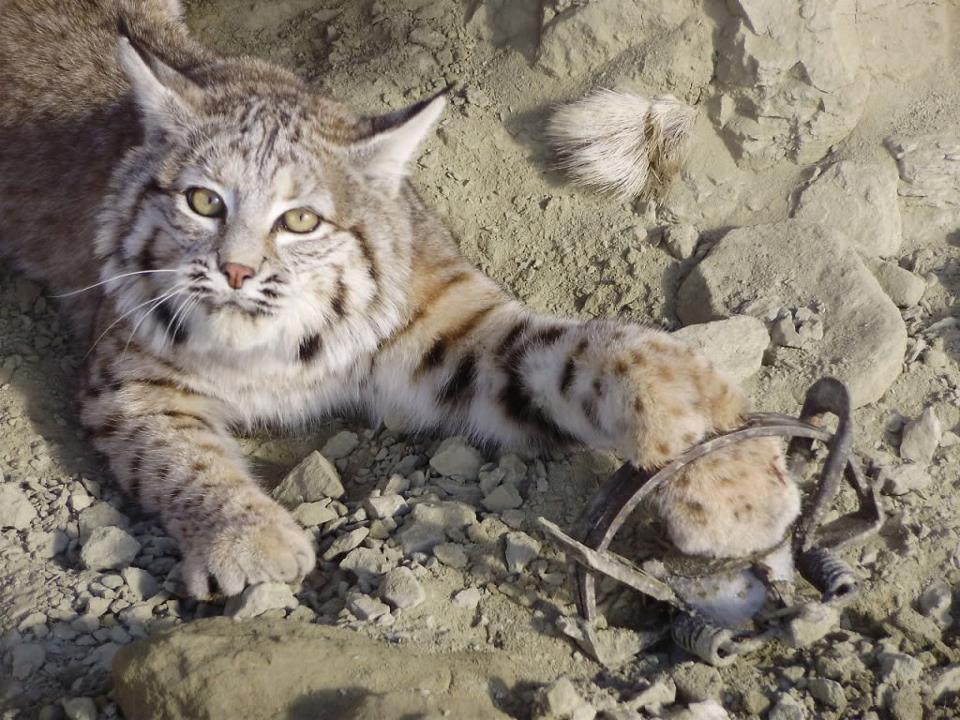
Bobcats under attack

The state finally was forced to react after 30,000 signatures called for action to deal with the obvious social harm. California decided to expand scope of protection from porous safe zones to the entire state.

Those familiar with PCI DSS compliance realize this is like a CIO agreeing to monitor every system under their authority for motivated attackers, instead of defining scope as only those few servers where PII should be found.

Justification of a statewide ban was based not just on evidence of attackers bypassing perimeters with ease. Conservationists pointed out that the authorities have failed to maintain any reasonable monitoring of harm to state assets.

[California] could not determine whether trapping jeopardized the species because they had no current scientific data

Thus we have an excellent study in nature of what we deal with constantly in infosec; a classic case of attackers adapting methods for personal gain while community/defenders are slow to build and examine feedback loops or reliable logs of harm.

Should it have taken 30,000 signatures before the state realized they had such obvious perimeter breaches?

Fortunately, bobcats now are protected better. The species will have a chance of survival, or at least protection from attack, as scientists figure out how best to design sustainable defenses.

Action taken sooner is far better than later. Once the species is driven to extinction it may be impossible to restore/recover, as has been the case with many other animals including the bear on the state flag.

Howto: Delete old Docker containers

I’ve been working quite a bit lately on a secure deletion tool for Docker containers. Here are a few notes on basic delete methods, without security, which hints at the problem.

  • List all current containers
  • $ docker ps -a

    CONTAINER ID  IMAGE        COMMAND   CREATED             STATUS                        PORTS  NAMES
    e72211164489  hello-world  "/hello"  About a minute ago  Exited (0) About a minute ago        ecstatic_goodall
    927e4ab62b82  hello-world  "/hello"  About a minute ago  Exited (0) About a minute ago        naughty_pasteur       
    d71ff26dbb90  hello-world  "/hello"  4 minutes ago       Exited (0) 4 minutes ago             hungry_wozniak        
    840279db0bd7  hello-world  "/hello"  5 minutes ago       Exited (0) 5 minutes ago             lonely_pare           
    49f6003093eb  hello-world  "/hello"  25 hours ago        Exited (0) 25 hours ago              suspicious_poincare   
    6861afbbab6d  hello-world  "/hello"  27 hours ago        Exited (0) 26 hours ago              high_carson           
    2b29b6d5a09c  hello-world  "/hello"  3 weeks ago         Exited (0) 3 weeks ago               serene_elion          
    
  • List just containers weeks old
  • $ docker ps -a | grep “weeks”

    CONTAINER ID  IMAGE        COMMAND   CREATED             STATUS                        PORTS  NAMES
    2b29b6d5a09c  hello-world  "/hello"  3 weeks ago         Exited (0) 3 weeks ago               serene_elion          
    
  • List all containers by ID
  • $ docker ps -a | grep ‘ago’ | awk ‘{print $1}’

    e72211164489  
    927e4ab62b82         
    d71ff26dbb90          
    840279db0bd7          
    49f6003093eb    
    6861afbbab6d         
    2b29b6d5a09c          
    
  • List all containers by ID, joined to one line
  • $ docker ps -a | grep ‘ago’ | awk ‘{print $1}’ | xargs

    e72211164489 927e4ab62b82 d71ff26dbb90 840279db0bd7 49f6003093eb 6861afbbab6d 2b29b6d5a09c          
    
  • List ‘hours’ old containers by ID, joined to one line, and if found prompt to delete them
  • $ docker ps -a | grep ‘hours’ | awk ‘{print $1}’ | xargs -r -p docker rm

    docker rm 49f6003093eb 6861afbbab6d ?...
    

    Press y to delete, n to cancel

This Day in History: Antoine de Saint-Exupéry Disappears

On July 31 in 1944 Antoine de Saint-Exupéry flew a Lockheed Lightning P-38 on a morning reconnaissance mission, despite being injured and nearly ten years over the pilot age limit. It was the last day he was seen alive. A bracelet bearing his name was later found by a fisherman offshore between Marseille and Cassis, which led to discovery of the wreckage of his plane.

Saint-Exupéry was an unfortunate pilot with many dangerous flying accidents over his career. One in particular was during a raid, an attempt to set a speed record from Paris to Hanoï, Indochine and back to Paris. Winning would have meant 150K Francs. Instead Saint-Exupéry crashed in the Sahara desert.

Besides being a pilot of adventure he also was an avid writer and had studied drawing in a Paris art school. In 1942 he wrote The Little Prince, which has been translated into more than 250 languages and is one of the most well-known books in the world. Saint-Exupéry never received any of its royalties.

It brings to mind the rash of people now posting videos and asking their fans to pay to view/support their adventures.

Imagine if Saint-Exupéry had taken a video selfie of his crash and survival in the Sahara desert and posted it straight to a sharing site, asking for funds…instead of writing a literary work of genius and seeing none of its success.

Convert Kali Linux VMDK to KVM

I was fiddling around in Ubuntu 14.04 with Docker and noticed a Kali Linux container installation was just four steps:

$ wget -qO- https://get.docker.com/ | sh
$ docker pull kalilinux/kali-linux-docker
$ docker run -t -i kalilinux/kali-linux-docker /bin/bash
# apt-get update && apt-get install metasploit

This made me curious about comparing to the VM steps. Unfortunately they still only offer a VMDK version to play with. And this made me curious about how quickly I could convert to KVM.

On my first attempt I did the setup and conversion in eight (nine if you count cleanup):

  1. Install KVM
  2. $ sudo apt-get install qemu-kvm libvirt-bin ubuntu-vm-builder bridge-utils virt-goodies p7zipfull

  3. Download kali vmdk zip file
  4. $ wget https://images.kali.org/Kali-Linux-1.1.0c-vm-amd64.7z

    (Optional) Verify checksum is 1d7e835355a22e6ebdd7100fc033d6664a8981e0

    $ sha1sum Kali-Linux-1.1.0c-vm-amd64.7z

  5. Extract zip file
  6. $ 7z x Kali-Linux-1.1.0c-vm-amd64.7z
    $ cd Kali-Linux-1.1.0c-vm-amd64
    $ ll

    -rw------- 1 user user 3540451328 Mar 13 03:50 Kali-Linux-1.1.0c-vm-amd64-s001.vmdk
    -rw------- 1 user user 1016725504 Mar 13 03:50 Kali-Linux-1.1.0c-vm-amd64-s002.vmdk
    -rw------- 1 user user 1261895680 Mar 13 03:50 Kali-Linux-1.1.0c-vm-amd64-s003.vmdk
    -rw------- 1 user user 1094582272 Mar 13 03:50 Kali-Linux-1.1.0c-vm-amd64-s004.vmdk
    -rw------- 1 user user  637468672 Mar 13 03:50 Kali-Linux-1.1.0c-vm-amd64-s005.vmdk
    -rw------- 1 user user  779747328 Mar 13 03:50 Kali-Linux-1.1.0c-vm-amd64-s006.vmdk
    -rw------- 1 user user 1380450304 Mar 13 03:50 Kali-Linux-1.1.0c-vm-amd64-s007.vmdk
    -rw------- 1 user user    1376256 Mar 13 03:50 Kali-Linux-1.1.0c-vm-amd64-s008.vmdk
    -rw------- 1 root root        929 Mar 13 02:56 Kali-Linux-1.1.0c-vm-amd64.vmdk
    -rw-r--r-- 1 user user          0 Mar 13 05:11 Kali-Linux-1.1.0c-vm-amd64.vmsd
    -rwxr-xr-x 1 root root       2770 Mar 13 05:11 Kali-Linux-1.1.0c-vm-amd64.vmx*
    -rw-r--r-- 1 user user        281 Mar 13 05:11 Kali-Linux-1.1.0c-vm-amd64.vmxf
    
  7. Convert ‘vmdk’ to ‘qcow2’
  8. $ qemu-img convert -f vmdk -O qcow2 Kali-Linux-1.1.0c-vm-amd64.vmdk qcow2 Kali-Linux-1.1.0c-vm-amd64.qcow2

  9. Change ownership
  10. $ sudo chown username:group Kali-Linux-1.1.0c-vm-amd64.qcow2

  11. Convert ‘vmx’ to ‘xml’
  12. $ vmware2libvirt -f Kali-Linux-1.1.0c-vm-amd64.vmx > Kali-Linux-1.1.0c-vm-amd64.xml

    (Note this utility was installed by virt-goodies. An alternative is to download just vmware2libvirt and run as “python vmware2libvirt -f Kali-Linux-1.1.0c-vm-amd64.vmx > Kali-Linux-1.1.0c-vm-amd64.xml”)

    (Optional) Create some uniqueness by replacing default values (e.g. mac address 00:0C:29:4B:9C:DF) in the xml file

    uuid
    $ uuidgen

    mac address
    $ echo 00:0C:$(dd if=/dev/urandom count=1 2>/dev/null | md5sum | sed ‘s/^\(..\)\(..\)\(..\)\(..\).*$/\1:\2:\3:\4/’)

    $ vi Kali-Linux-1.1.0c-vm-amd64.xml

  13. Create VM
  14. $ sudo ln -s /usr/bin/qemu-system-x86_64 /usr/bin/kvm
    $ virsh -c qemu:///system define Kali-Linux-1.1.0c-vm-amd64.xml

  15. Edit VM configuration to link new qcow2 file
  16. Find this section

    driver name='qemu' type='raw'
    source file='/path/Kali-Linux-1.1.0c-vm-amd64.vmdk'

    Change raw and vmdk to qcow2

    driver name='qemu' type='qcow2'
    source file='/path/Kali-Linux-1.1.0c-vm-amd64.qcow2'

  17. Start the VM
  18. $ virsh start Kali-Linux-1.1.0c-vm-amd64

  19. Delete vmdk
  20. $ rm *.v*