Category Archives: Security

Software That Dominates: Palantir Wants Denazification Undone

Palantir published a 22-point summary of Alex Karp and Nicholas Zamiska’s book The Technological Republic.

The company calls their manifesto the ideology behind its work. Read the 22 points as operational doctrine with a historical understanding. The philosophical framing is thin cover for Nazism.

Buried in point 15 is their core thesis:

The postwar neutering of Germany and Japan must be undone.

Palantir argues the defanging of Germany was an overcorrection that Europe now pays for. Denazification is their complaint.

The claim lives only on the most extreme far right. The AfD platform. Identitäre Bewegung. Alain de Benoist’s Nouvelle Droite. The Nolte and Hillgruber revisionism of the 1986 Historikerstreit. A US surveillance contractor with federal data access has now published Nazism as corporate doctrine.

The rest of the manifesto builds bogus intellectual support around that line. Every point maps to a documented fascist or proto-fascist source. The whole document reads as interwar European far-right theory adapted for Silicon Valley.

Line analysis

Palantir point (paraphrased) Historical precedent
1. Engineers owe the state defense work as obligation. Gleichschaltung. Industry coordinated with state mission. Thyssen, Krupp, IG Farben. Jünger, Total Mobilization (1930).
2. Consumer apps have enfeebled civilization. Spengler, Decline of the West (1918). Jünger, Der Arbeiter (1932). Consumer comfort as civilizational decay.
3. Decadent elites earn forgiveness through economic performance. Mussolini’s productivist fascism. Schmitt on the state of exception overriding constitutional form.
4. Moral appeal has failed. Power runs on software. Schmitt, The Concept of the Political (1932). The friend-enemy distinction as the essence of politics.
5. AI weapons are inevitable. The only question is who builds them. Ludendorff, Der totale Krieg (1935). Interwar armament inevitability doctrine.
6. Universal national service. Volksgemeinschaft through shared sacrifice. Prussian militarism. Jünger’s total mobilization applied to the civilian.
7. The military gets what it asks for. Same for software procurement. Wehrwirtschaft. Private industry fused to war economy. Göring’s Four Year Plan (1936).
8. Government workers hold no priestly authority. Schmitt on parliamentarism as degenerate. Interwar anti-bureaucratic populism of the right.
9. Public figures deserve grace. Nietzsche’s pathos of distance. Elite impunity repackaged as aristocratic privilege.
10. Politics should be hard externality, stripped of interior life. Jünger and Schmitt reject liberal psychology as political solvent.
11. Victory over enemies should prompt pause. Historikerstreit. Relativizing the moral weight of the Allied victory over Nazism. Sets up point 15.
12. Atomic deterrence gives way to AI deterrence. Permanent war as civilizational condition. Schmitt, The Nomos of the Earth (1950).
13. The US has advanced progressive values more than any nation. Sonderweg logic. Civic religion of American exceptionalism as providential mission.
14. American power produced the long peace. Imperial apologetics. Erasure of Korea, Vietnam, Iraq, Afghanistan, and proxy wars from the ledger.
15. Denazification and Japanese pacifism must be undone. AfD platform. Nouvelle Droite. Nolte-Hillgruber revisionism. The explicit far-right core of the document.
16. Musk’s grand narrative deserves serious engagement. Carlyle’s Great Man theory. Nietzsche’s Übermensch laundered through founder worship.
17. Silicon Valley takes on violent crime where politicians refuse. Freikorps logic. Private force supplanting the state monopoly on violence once the state is framed as weak.
18. Scrutiny drives talent from public service. Elite impunity doctrine. Schmitt on the liberal press as political enemy.
19. Caution in public life is corrosive. Transgression is virtue. Evola and Jünger. Aristocratic transgression against bourgeois timidity.
20. Elite hostility to religion must be resisted. Schmitt, Political Theology (1922). Christian Front of the 1930s. Modern integralism.
21. Cultures rank on a hierarchy of advancement and regression. Gobineau, Essay on the Inequality of Human Races (1853). Chamberlain, Foundations of the Nineteenth Century (1899). Evola, Revolt Against the Modern World (1934).
22. Pluralism and inclusivity are hollow temptations. Schmitt on the homogeneous demos. De Benoist’s ethnopluralism. The open society reframed as the enemy.

WTF

Palantir’s own X bio states this:

Software that dominates.

That is the corporate self-description, published next to a Nazi manifesto arguing for cultural hierarchy and the undoing of denazification.

These two artifacts speak for each other.

Palantir sells the software that executes the politics. ICE runs on Palantir. The US Army runs on Palantir. NYPD runs on Palantir. The company writes the database queries the state uses to decide who to deport, who to arrest, who to target.

The manifesto tells all these buyers what the company believes the end state should be. The product enforces the belief in decline and destruction of democracy.

The denazification line exposed their objective. The rest is just the plan.

WhatsApp Encryption Still a Lie: Feds Arrest Arms Dealer at LAX

Federal agents arrested Shamim Mafi at LAX on Saturday night. The criminal complaint describes Mohajer-6 drones, bomb fuses, and millions of rounds of Iranian ammunition moving through an Oman-registered shell called Atlas International Business to the Sudanese Armed Forces.

This is a story about WhatsApp encryption.

The communication channel was WhatsApp.

Contract terms were on WhatsApp.

Cash logistics were on WhatsApp.

In turkey we can just accept in exchange. And it should be in cash.

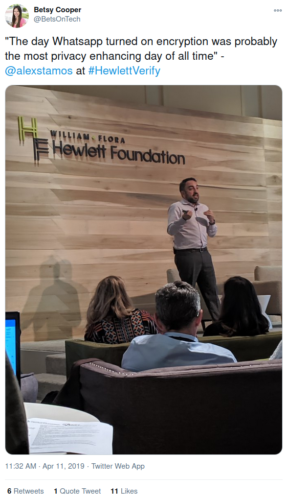
The FBI put the private WhatsApp messages in a public filing. How? Why? Meta doesn’t just market WhatsApp as end-to-end encrypted, they send security talking-heads like Alex Stamos around to call WhatsApp privacy better than sliced bread.

Source: Twitter

That’s a lot of nonsense and it literally has gotten people killed for believing it.

Two architectural facts collapse the aggressive marketing. Cloud backups first disproved the claims. WhatsApp synced chats to iCloud and Google Drive in plaintext by default until late 2021. Meta added opt-in encrypted backups then and left the default unchanged. A subpoena to Apple or Google reaches message content through the backup layer. The encryption protected the wire, while a backup always held the plaintext copy out for inspection.

The report button came next, which I consider an intentional backdoor that Signal does not have (WhatsApp encryption is just Signal underneath, with the backdoor added). ProPublica documented it in September 2021. Roughly 1,000 Accenture contractors in Austin, Dublin, and Singapore review user reports. When either party taps report, the client forwards the last five messages plus media to Meta in plaintext. The counterparty whose chats land in the review queue never consents. Meta writes the trigger conditions. Meta can expand the window by software update.

The arrests keep coming. The encryption claim keeps recruiting users who route sensitive communications through Meta. The FBI reads them. Every conviction built on WhatsApp evidence is proof the product worked how Facebook intended, just not as advertised.

Client-side exfiltration with end-to-end marketing on the label is not privacy. Cryptography was sprinkled on the wire while the architecture kept the content readable by third parties … by design

Run Ollama on AMD GPU ROCm with TuxedoOS

If you’re like me, you might end up with an AMD machine wondering how to squeeze as many agents as possible onto it for the least amount of hassle possible. Fortunately, AMD ships amdgpu-install as the official way to put ROCm on Linux. Unfortunately, their handy script reads /etc/os-release, checks the ID field against a supported list, and if the distro is not there it…exits. I say it is unfortunate because it appears to be a lazy cop, far too strict for reality.

Take TuxedoOS 24.04 for example. It’s Ubuntu 24.04 (Noble) with a modified kernel and a few Tuxedo packages on top. Every AMD apt repository works. Every library installs cleanly. Nothing gets in the way until this amdgpu-install OS check shows up and falls over.

Challenge accepted. Here’s the happy path to a GPU-accelerated Ollama on a new TuxedoOS laptop that has the Kraken Point APU (Radeon 860M, gfx1152). You may find the same method works for other AMD APUs and dGPUs, and for other Ubuntu-derived distros.

It turned out to not be any problem at all, so I hope AMD reconsiders their lazy cop.

Step 1: Present “clean” credential

I know this is stupid, but it’s really the trick. You just bind-mount a temporary os-release that says you are running Ubuntu Noble. The mount is process-global, reverts on unmount, and does not touch the real file on disk.

sudo tee /tmp/os-release-ubuntu >/dev/null <<'EOF'
PRETTY_NAME="Ubuntu 24.04 LTS"
NAME="Ubuntu"
VERSION_ID="24.04"
VERSION="24.04 LTS (Noble Numbat)"
VERSION_CODENAME=noble
ID=ubuntu
ID_LIKE=debian
UBUNTU_CODENAME=noble
EOF
 
sudo mount --bind /tmp/os-release-ubuntu /etc/os-release

Nothing else on the system sees the change. When you unmount, the original os-release is back. A reboot also clears it.

AMD doesn’t care and doesn’t check anything else, which kind of goes to my point about how poorly their support is running right now. I would have expected them to check their own hardware first, distribution last. That’s better framing to get people to want to use the hardware.

Step 2: Install AMD repository and ROCm

Run the AMD installer script as they say.

ROCm 7.2.1 supports the latest Radeon 9000 Series (RDNA 4) and select 7000 Series (RDNA 3) GPUs, and introduces support for Ryzen APUs

sudo apt update
wget https://repo.radeon.com/amdgpu-install/7.2.1/ubuntu/noble/amdgpu-install_7.2.1.70201-1_all.deb
sudo apt install ./amdgpu-install_7.2.1.70201-1_all.deb
amdgpu-install -y --usecase=rocm --no-dkms

The --no-dkms flag has to be there. AMD ships ROCm for Ryzen APUs on top of the inbox amdgpu kernel driver. Installing their DKMS module on a non-Ubuntu kernel leads to mismatches. The inbox driver in any recent kernel (6.14 or later) works.

When the install completes, unmount the bind, since we don’t need to fool them anymore:

sudo umount /etc/os-release

Step 3: Join GPU group and reboot

ROCm requires the current user to be in the render and video groups. Without these, rocminfo will not see the GPU.

sudo usermod -aG render,video $USER
sudo reboot

Step 4: Verify GPU is recognized

After the reboot, confirm three things: group membership, GPU enumeration, and OpenCL platform.

groups
rocminfo | grep -A2 "Agent 2"
/opt/rocm/bin/clinfo | grep -E "Device Name|Platform Name"

Expected output for the Kraken Point system I am testing with:

Name: gfx1152
Marketing Name: AMD Radeon 860M Graphics
Platform Name: AMD Accelerated Parallel Processing

Step 5: Prove HIP compiles and runs

The ROCm 6+ API dropped gcnArch in favor of gcnArchName so I used this test:

cat > /tmp/hip_test.cpp <<'EOF'
#include <hip/hip_runtime.h>
#include <cstdio>
int main() {
  int n = 0;
  (void)hipGetDeviceCount(&n);
  printf("HIP devices: %d\n", n);
  for (int i = 0; i < n; i++) {
    hipDeviceProp_t p;
    (void)hipGetDeviceProperties(&p, i);
    printf("  %d: %s (%s)\n", i, p.name, p.gcnArchName);
  }
}
EOF
/opt/rocm/bin/hipcc /tmp/hip_test.cpp -o /tmp/hip_test
/tmp/hip_test

Successful output will look like this:

HIP devices: 1
  0: AMD Radeon Graphics (gfx1152)

At this point ROCm itself is complete. Every application that links against the system ROCm libraries will find the GPU.

WE’RE DONE! But wait, there’s more

Ollama now supports AMD graphics cards

Step 6: Strap Ollama to the GPU

Ollama bundles its own ROCm runtime in /usr/local/lib/ollama/rocm. The system ROCm install does not affect it. Ollama’s precompiled kernels target a specific list of GPU architectures, and gfx1152 is not currently on that list. Maybe it will be. But in the meantime the easy solution is to use HSA_OVERRIDE_GFX_VERSION, which tells the HSA runtime to treat the installed GPU as a different architecture. For RDNA 3.5 APUs (gfx1150, gfx1151, gfx1152), setting it to 11.0.0 loads gfx1100 kernels. RDNA 3 and RDNA 3.5 are close enough that gfx1100 code runs on RDNA 3.5 silicon for every op Ollama uses.

Create a systemd drop-in so the override persists across restarts:

sudo mkdir -p /etc/systemd/system/ollama.service.d
sudo tee /etc/systemd/system/ollama.service.d/override.conf >/dev/null <<'EOF'
[Service]
Environment="HSA_OVERRIDE_GFX_VERSION=11.0.0"
Environment="HIP_VISIBLE_DEVICES=0"
Environment="ROCR_VISIBLE_DEVICES=0"
EOF
 
sudo systemctl daemon-reload
sudo systemctl restart ollama

Confirm the environment actually reached the process:

sudo cat /proc/$(pgrep -f 'ollama serve')/environ | tr '\0' '\n' | grep -iE "hsa|hip|rocr"

Check the Ollama logs:

sudo journalctl -u ollama -n 80 --no-pager | grep -iE "rocm|gpu|inference compute"

Success will look something like this:

library=ROCm compute=gfx1100 name=ROCm0 description="AMD Radeon 860M Graphics" total="15.7 GiB" type=iGPU

Ollama reports the 860M is gfx1100 and it is ready to offload model layers to it instead of soaking up your CPU cores. For example, before I wired the GPU my 16 cores were pegged 100% for five minutes or more. After, CPU was running 5% while the GPU was pegged.

Step 7: GPU spotting during inference

Open up the system monitor (preferred if you like cool visuals) or just start the rocm-smi in a loop in one terminal:

watch -n 0.5 rocm-smi

Then in another terminal run inference:

ollama run llama3.2:3b "explain the Bauhaus movement in detail"

GPU utilization shoots above 90% during generation. VRAM used jumps to roughly the model size.

Once you see jumps, it’s tuning time

Figuring out fast and stable under real workloads is a bigger post. To quickly get started, there are four AMD APU knobs to turn:

  1. Shared memory ceiling
  2. Ollama runtime flags
  3. CPU governor
  4. Power profile

First, with shared memory ceiling the AMD APUs have no dedicated VRAM. It’s kind of their cost-saving thing. The kernel caps how much system RAM the GPU can address via a Translation Table Manager (TTM) pages limit. The default is half the system RAM. Raising it costs nothing when the GPU is idle. On a 32GB system, I figure we should roughly estimate just below 24GB.

sudo apt install -y pipx
pipx ensurepath
pipx install amd-debug-tools
 
amd-ttm           # show current
amd-ttm --set 22  # raise to 22GB

The 22 GiB leaves enough headroom for the OS, a browser, and KDE, as absurd as that sounds. I remember back in the day… nevermind. On 64 GB, 48GB would be my starting point. On 128 GB you can use AMD’s own recommendation of 96GB, which is kind of like saying the people who have the most money and least need for tuning get the AMD team’s attention.

The setting persists in /etc/modprobe.d/ttm.conf and takes effect after reboot.

Second, Ollama has four flags that affect iGPU inference:

sudo tee /etc/systemd/system/ollama.service.d/override.conf >/dev/null <<'EOF'
[Service]
Environment="HSA_OVERRIDE_GFX_VERSION=11.0.0"
Environment="HIP_VISIBLE_DEVICES=0"
Environment="ROCR_VISIBLE_DEVICES=0"
Environment="OLLAMA_FLASH_ATTENTION=1"
Environment="OLLAMA_KV_CACHE_TYPE=q8_0"
Environment="OLLAMA_NUM_PARALLEL=1"
Environment="OLLAMA_MAX_LOADED_MODELS=1"
Environment="OLLAMA_KEEP_ALIVE=30m"
EOF
sudo systemctl daemon-reload
sudo systemctl restart ollama

OLLAMA_FLASH_ATTENTION=1 cuts KV cache memory by roughly half on most modern models. OLLAMA_KV_CACHE_TYPE=q8_0 quantizes the KV cache to 8-bit, which saves significant memory for long contexts with negligible quality cost. OLLAMA_NUM_PARALLEL=1 and OLLAMA_MAX_LOADED_MODELS=1 prevent Ollama from thrashing the shared memory pool with concurrent requests, which can be truly painful to the user experience on an iGPU. OLLAMA_KEEP_ALIVE=30m holds the model in GPU memory for half an hour instead of the default five minutes, because cold-starts are the slowest part of inference when using memory that isn’t dedicated.

Third, the CPU governor. Are you on a laptop? I sure am. For obvious reasons a laptop setting is usually powersave or schedutil, both of which clock down the CPU during the token-decode phase that runs between GPU kernels.

cat /sys/devices/system/cpu/cpu0/cpufreq/scaling_governor
sudo cpupower frequency-set -g performance

Fourth, power profile. TuxedoOS is very proud of their widget and app for power management. It’s a bit annoying, really, but it is what it is and it can override governor decisions. Their Tuxedo Control Center (TCC) also handles fan curves and hardware-specific quirks. TCC masks power-profiles-daemon on purpose, and so we use TCC.

tuxedo-control-center &

I chose a performance-oriented profile in the GUI, which seems weird because it’s literally just a toggle. Why have a UI for a toggle? Maybe I’ll create a custom one with the CPU governor set to performance and the fan curve ramped up for sustained load. On non-Tuxedo distros that use power-profiles-daemon, the equivalent is powerprofilesctl set performance. I will say this, when I was hammering the CPU before the GPU was recognized, the fans were so loud I couldn’t hear myself think and my USB hub literally started screaming and shutdown from the power conflicts. Anker, we need to have a word.

Reboot after the TTM change, and everything should be in place. Verify like this:

amd-ttm
sudo journalctl -u ollama --since "2 minutes ago" --no-pager | grep "inference compute"

The Ollama log line should show the new total VRAM ceiling matching your TTM setting.

Benchmark

When it’s good to go, you can send a generation through the API and check timing fields:

curl -s http://127.0.0.1:11434/api/generate -d '{
  "model": "qwen2.5:7b",
  "prompt": "Write a 300-word analysis of the Bauhaus Dessau period",
  "stream": false
}' > /tmp/ollama_result.json
 
python3 <<'EOF'
import json
d = json.load(open("/tmp/ollama_result.json"))
eval_s = d["eval_duration"] / 1e9
prompt_s = d["prompt_eval_duration"] / 1e9
print(f"prompt eval:  {d['prompt_eval_count']} tokens in {prompt_s:.2f}s = {d['prompt_eval_count']/prompt_s:.1f} tok/s")
print(f"generation:   {d['eval_count']} tokens in {eval_s:.2f}s = {d['eval_count']/eval_s:.1f} tok/s")
EOF

On my Radeon 860M (gfx1152, 8 CU RDNA 3.5) with 22GB TTM, performance governor, and flash attention enabled I posted these numbers:

llama3.2:3b Q4 → 31 tok/s generation, 360 tok/s prompt eval
qwen2.5:7b Q4 → 15 tok/s generation, 187 tok/s prompt eval

They are bandwidth-bound. Kraken Point has a 128-bit LPDDR5X memory bus at roughly 120 GB/s. Generation speed scales inversely with model size. Each token streams the full weights through memory. The 2.1x speed ratio between 3B and 7B tracks the 2.4x size ratio, consistent with a memory-bandwidth ceiling.

Then we can confirm the model was being fully offloaded to GPU:

curl -s http://127.0.0.1:11434/api/ps | python3 -m json.tool | grep -E "size|vram"

size_vram equals size. The entire model is in GPU memory.

Fiddle context length

Since Ollama defaults to 4096-token context on every model, I figure it’s worth a change. I tend to live in a world of longer files, and that means more memory is needed. With q8_0 KV cache, qwen2.5:7b at 8K adds roughly 500MB over the 4K default, and 16K adds about 1GB. On our 22GB ceiling this is still reasonable. Generation speed drops about a quarter at 16K versus 4K because more KV cache streams through memory per token. There is no CLI flag, so it will be set per request, per model, or globally.

Per request via the API:

curl -s http://127.0.0.1:11434/api/generate -d '{
  "model": "qwen2.5:7b",
  "prompt": "summarize this long document ...",
  "stream": false,
  "options": { "num_ctx": 16384 }
}'

Per model via a Modelfile, creating a named variant:

cat > /tmp/qwen-16k.modelfile <<'EOF'
FROM qwen2.5:7b
PARAMETER num_ctx 16384
EOF
ollama create qwen2.5:7b-16k -f /tmp/qwen-16k.modelfile
ollama run qwen2.5:7b-16k

Globally for every model, add to the systemd drop-in:

Environment="OLLAMA_CONTEXT_LENGTH=8192"

What else can I tell you?

A new Tuxedo Computer running TuxedoOS on an AMD APU can feed Ollama the GPU. System ROCm 7.2.1 is available for any application that wants it. The HIP toolchain works on the actual architecture. With a tuned Ollama service, models fit GPU memory, flash attention gets used, and the KV cache gets “quantized” for comfortable context lengths.

Really this absurdly long post is a nothing-burger. There were two workarounds: a bind-mount for the installer’s OS check, and an HSA version override for Ollama’s bundled runtime. Neither touches the hardware, neither modifies any vendor code, and both revert cleanly.

Come on AMD, this post really doesn’t even need to exist, but you forced me to write it because of your lazy “are you on the list” cop.

:~$ ollama run qwen2.5:7b
>>> write a haiku
秋叶落无声,
风过知时节,
静待冬来临。
+-----------------------------+
|           prompt            |
+--------------+--------------+
               |
+--------------v--------------+
|           Ollama            |
+--------------+--------------+
               |
+--------------v--------------+
|  HSA_OVERRIDE_GFX_VERSION   |
|         = 11.0.0            |
|   (gfx1100 kernels load)    |
+--------------+--------------+
               |
+--------------v--------------+
|      ROCm 7.2.1 / HIP       |
+--------------+--------------+
               |
+--------------v--------------+
|   amdgpu (inbox driver)     |
|   Linux 6.17 (TuxedoOS)     |
+--------------+--------------+
               |
+--------------v--------------+
|        Radeon 860M          |
|          gfx1152            |
+-----------------------------+
Build an OpenClaw Free (Secure), Always-On Local AI Agent

OpenClaw isn’t fooling me. I remember MS-DOS.

The sad days of DOS. Any program could peek and poke the kernel, hook interrupts, write anywhere on disk. There was no safety.

The fix wasn’t a wrapper, or a different shell. It was a whole different approach to what was being done. The world already had rings, virtual memory, ACLs, separate address spaces. Thirty years of separations that Unix had from the start were ignored, and it finally caught up to the world of DOS.

I’m not saying DOS wasn’t wildly popular. Oh my god. I remember one dark night in a bar in Chicago, a drunk Swedish IT consultant jumped onto a table and said “listen up everyone!”. As he waved his beer mug around, sloshing carelessly, with wobbly legs, he said he was in town to work on Wal-Mart Point-of-sale (POS) devices running MS-DOS. Why was he acting like this? He was happy, very, very happy. He wanted us to know he loved his work, something like “CAN YOU BELIEVE WAL-MART HAS HUNDREDS OF THOUSANDS OF DOS MACHINES WITH ALL YOUR F$%#$%NG PAYMENT CARD DATA?! HAHAHA! AND IT ALL HAS ONE PASSWORD THAT EVERYONE SHARES! YOU WANT IT?! I GOT IT RIGHT HERE! FREEDOM, AMERICA, F$#%$K YEAH!”

True story. Both the guy and Wal-Mart put ALL customer information on MSDOS with exactly zero safety.

NCR had just announced a new MS-DOS-based PC…we decided to build a custom solution for Wal-Mart. I managed to connect a cash drawer and a POS printer to the new PC and wrote a dedicated Layaway application in compiled MS Basic. For the first time, Wal-Mart could store customer info on a disk. A clerk could search by name in seconds, and more importantly, the system tracked exactly where the merchandise was tucked away in the backroom. It was a massive efficiency win, and NCR ultimately rolled it out to all Wal-Mart stores.

Personal identity information was never breached faster! Massive efficiency win, indeed. When Wal-Mart was breached in 2006 they naturally had to wait three long years to notify anyone. So efficient.

Agent gateways feel like we are racing backwards into the MS-DOS era. At any minute in a bar I expect a drunk Swedish IT consultant to be standing on a table waving his lobster around, swearing about his single token for all agents. Because, let’s face it, when you look at gateways out there they can hand the model an exec tool and trust it. One process, one token, with the LLM holding the line.

NVIDIA clearly has seen the storm brewing and therefore published a thoughtful tutorial walking through a “NemoClaw” self-hosted agent setup on DGX Spark.

Use NVIDIA DGX Spark to deploy OpenClaw and NemoClaw end-to-end, from model serving to Telegram connectivity, with full control over your runtime environment.

I appreciate this effort. Real engineering, carefully done. I took the tutorial to learn and I followed it in Wirken, a gateway I’ve been building, to document what each step looked like.

The tutorial has you bind Ollama to 0.0.0.0 so the sandboxed agent can reach it across a network namespace. Then it pairs the Telegram bot by sending a code through the chat channel. It next approves blocked outbound connections in a separate host-side TUI. Each of those seem to be steps to address a real problem, which is how to put security around something that doesn’t work when it has security around it. It’s what an architecture requires when the sandbox sits around the whole agent.

Call me old-fashioned but I anticipated a lot of this in Wirken by giving the agent more safety by shrinking the boundaries. Each channel is a separate process with its own Ed25519 identity. The vault runs out of process. Inference stays on loopback because the agent is on the host. Shell exec runs in a hardened container configured at the tool layer, rather than trying to wrap around the whole agent. Sixteen high-risk command prefixes prompt on every call; others are first-use with a 30-day memory.

Here’s what I found, step by step

Step NemoClaw Wirken.AI
1. Runtime Register the NVIDIA container runtime with Docker, set cgroup namespace mode to host. Foundational setup because the agent runs inside a container. No equivalent step. The gateway runs as a host process. Docker appears only as a per-tool-call sandbox for shell exec, provisioned lazily.
2. Ollama Override OLLAMA_HOST to 0.0.0.0 so the sandboxed agent can reach inference across its own network namespace. Ollama stays on 127.0.0.1. The agent is a host process, so loopback is enough.
3. Install curl-pipe-bash from an NVIDIA URL. curl-pipe-sh as well. The installer verifies the release signature with ssh-keygen against an embedded key, fail-closed on every failure path. The installer’s own SHA is pinned in the README for readers who want to check the script before piping.
4. Model ollama pull the model, then ollama run to preload weights into GPU memory. Same pattern. Both delegate inference to Ollama.
5. Onboarding Wizard produces a sandbox image with policy and inference baked in, as a named rebuildable unit. Wizard writes provider config and channel registrations. The permission model lives in the binary; runtime state is which action keys have been approved.
6. Telegram Pairing code sent through the chat channel; user approves from inside the sandbox. Binds a platform user to the agent at first contact. Bot token into an encrypted vault, fresh Ed25519 keypair for the adapter, no in-chat pairing. Approval granularity is per action and per agent rather than per channel user.
7. Web UI Localhost URL with a capability token in the fragment, not shown again. Localhost URL, loopback-bound, no token required.
8. Remote access Host-side port forward started through OpenShell, then SSH tunnel. The extra hop is because the UI lives inside a netns. SSH tunnel only. The WebChat listener is already on host loopback.
9. Policy Enforces at the netns boundary. Outbound connections are surfaced in a TUI with host, port, and initiating binary. Approve for the session or persist. Enforces at the tool dispatch layer. Sixteen high-risk command prefixes always prompt; others are first-use, remembered 30 days. Approved commands run inside a hardened Docker container with cap_drop ALL, no-new-privileges, read-only rootfs, 64MB tmpfs at /tmp, and no network.

Looking at my audit logs

The architectural claims above are recorded in the logs of the tutorial work. Wirken uses a hash-chained audit database of the webchat session, so here’s what that looked like in version 0.7.5.

First, the Tier 3 denial on curl:

[ 4] assistant_tool_calls
     call: exec({"command":"curl https://httpbin.org/get"})
[ 5] permission_denied
     action_key='shell:curl'  tier=tier3
[ 6] tool_result
     tool=exec success=False
     output: Permission denied: 'exec' requires tier3 approval.
[10] attestation
     chain_head_seq=9
     chain_head_hash=ff57c574ab503a74fa942ddb164def0df5bfbff05e5d5d6ecadcf127bce7e021

The tool call never reached the sandbox. The denial is recorded as a typed event in the audit chain, covered by the per-turn attestation.

Second, the hardened sandbox on sh. With shell:sh pre-approved at Tier 2, the same agent runs a compound command that probes three locations:

[14] assistant_tool_calls
     call: exec({"command":"sh -c \"touch /cannot_write_here 2>&1; ...\""})
[15] tool_result
     tool=exec success=True
     output:
       touch: cannot touch '/cannot_write_here': Read-only file system
       ws_ok=1
       tmp_ok=1
[19] attestation
     chain_head_seq=18
     chain_head_hash=6bf35f22df02b496244091e54b4dbf9b3ffdcf6a03485413f0522b84e2eb08a8

Read-only file system is the kernel refusing to open a new file against a read-only mount. Not a DAC check, the rootfs itself. ws_ok=1 confirms the workspace bind-mount stayed writable. tmp_ok=1 confirms the tmpfs at /tmp did too.

Both receipts are consecutive rows from the same session, hash-chained through to the attestation signatures at seq 9 and seq 18. wirken sessions verify replays the chain and confirms every leaf hash matches its payload and every chain hash matches SHA-256(prev_hash || leaf_hash).

How big is your boundary?

The workarounds in the tutorial are trying to make the best of a foundation that doesn’t separate concerns the way engineers typically like. Bind to 0.0.0.0 because the sandbox can’t reach loopback. Pair through the chat channel because there’s no separate identity plane. Wrap the whole agent in a container because the agent itself isn’t yet trusted. Approve at the netns boundary because the tool layer has no concept of permission.

Each of those is a compromise; response to a constraint. The constraint is worth revisiting like it’s 1985 again and we can stop Bill Gates.

Abort, Retry, Fail today but tomorrow I promise there will be a better shell.

In 1973 Unix got process separation, user separation, file permissions, and pipes between small programs. By 1995 I was all-in on Linux, building kernels by hand and starting this blog named flyingpenguin, because it had inherited them and made them the default.

In 2020 Microsoft finally admitted Linux was their better future, which everyone knows today.

Back in 2001, former Microsoft CEO Steve Ballmer famously called Linux “a cancer” … During a [2020] MIT event, [Microsoft president Brad] Smith said: “Microsoft was on the wrong side of history”

The agent space is still early and some people never learn the past. Wirken is one take on what it looks like when you remember. Like, remember the sheer horror of trying to protect anything in DOS? Remember the Wal-Mart breach of 2006, reported in 2009?

It’s just a question of whether we apply what computer history already knows to how we make agents safe for daily use. There are dozens of others doing versions of their own Wirken, and I’d genuinely like to hear from people working on the same problem; the architectures can converge in more than one way.

Repo: wirken.ai