Deaths in America from heart disease are on the rise as a 2016 report warned
Heart disease is the No. 1 cause of death in the United States. But after nearly three decades in decline, the number of deaths from heart disease has increased in recent years, a new federal report shows.
Now a new study called “Data breach remediation efforts and their implications for hospital quality” (PDF) reports that a service quality decline increases death rates for patients with heart disease.
Breach remediation efforts were associated with deterioration in timeliness of care and patient outcomes. Remediation activity may introduce changes that delay, complicate or disrupt health IT and patient care processes.
More specifically the study authors counted 36 more dead per 10,000 heart attacks every year due to security breaches, based on hundreds of hospitals examined. It even boils the data down to showing any care center with a breach will experience an electrocardiogram delay of 2.7 minutes for suspected heart attack patients.
Given the huge rise of ransomware since 2015, traced to weak security management practices of database companies, is there a case now to be made that software development is directly culpable for a rise in human deaths?
To put this in perspective, fewer people die from service delays (availability) than from mistakes (integrity), yet downstream integrity is impacted by availability. Medicals error studies call disruptions and mistakes the third leading cause of death in America.
A recent Johns Hopkins study claims more than 250,000 people in the U.S. die every year from medical errors. Other reports claim the numbers to be as high as 440,000.
Avoiding death from heart disease, which requires fast response and critical decision-making without error, becomes even harder to ensure as system availability declines due to breaches.
This new NY Books essay reads to me like prose and raises some important points about the desire to escape, and believing reality exists in places that we are not:
…when I look back at the series of wilderness travel articles I wrote for The New York Times a decade ago, what jumps out at me is the almost monomaniacal obsession with enacting Denevan’s myth by finding unpopulated places. Camped out in the Australian outback, I boasted that it was “the farthest I’d ever been from other human beings.” Along the “pristine void” of a remote river in the Yukon, I climbed ridges and scanned the horizon: “It was intoxicating,” I wrote, “to pick a point in the distance and wonder: Has any human ever stood there?”
Rereading those and other articles, I now began to reluctantly consider the possibility that my infatuation with the wilderness was, at its core, a poorly cloaked exercise in colonial nostalgia—the urbane Northern equivalent of dressing up as Stonewall Jackson at Civil War reenactments because of an ostensible interest in antique rifles.
As a historian I’d say he’s engaging in a poorly cloaked exercise is escapism, more like going to Disneyland than trying to reenact real events from the past (whether it be the white supremacist policies of Britain or America).
Earlier this year researchers disclosed in a study that the lack of regulation has allowed BitCoin markets to be over 90% fraud.
Nearly 95% of all reported trading in bitcoin is artificially created by unregulated exchanges, a new study concludes, raising fresh doubts about the nascent market following a steep decline in prices over the past year.
Bitcoin prices were being manipulated in late 2013 by a pair of autonomous computer programs running on bitcoin exchange MtGox, according to an anonymously published report.
The programs, named Willy and Markus, allegedly pushed prices up to $1,000 before the bubble burst after MtGox’s collapse in late February.
The report’s author alleges that some of the trades were coming from inside the exchange itself. “In fact,” the report says, “there is a ton of evidence to suggest that all of these accounts were controlled by MtGox themselves.”
The farm has both left- and right-wing troll accounts. That makes their smear and support campaigns more believable: instead of just taking one position for a client, it sends trolls to work both sides, blowing hot air into a discussion, generating conflict and traffic and thereby creating the impression that people actually care about things when they really don’t – including, for example, about the candidacy of a recently elected member of the Polish parliament.
I suppose we can say now the Ashley Madison dataset was no exception to widespread online fraud:
Over 20 million male customers had checked their Ashley Madison email boxes at least once. The number of females who checked their inboxes stands at 1,492. There have already been multiple class action lawsuits filed against Ashley Madison and its parent company, Avid Life Media, but these findings could send the figures skyrocketing. If true, it means that just 0.0073% of Ashley Madison’s users were actually women — and that changes the fundamental nature of the site.
People keep asking what will a future life with robots look like, when we’re obviously already living in it. It basically looks like a world where the late 1800s common phrase in America “there is a sucker born every day” continues to haunt the security industry…
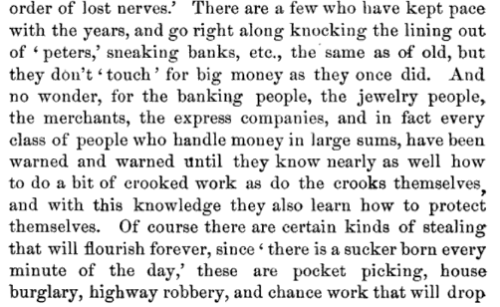
The Great Conspiracy: A Complete History of the Famous Tally-sheet Cases, by Simeon Coy, 1889, p 222
“Sneaking” banks refers to a social engineering trick where one person creates a distraction while the other sneaks money out of the vault.
Note how even back in 1889 an author writes about banks and jewlers hacking themselves to become wise to how to stop hackers. Threats mostly were targeting people too weak to protect themselves individually (hinting towards a need for regulatory oversight).
Update February 2022: A brand new book about Marvin Williams been published! Check it out.
I’ve searched high and low and there seems to be no mainstream re-telling of the exact Marvin Williams murder story. It reads like such an obvious script for a major movie I’m curious why nothing has been done.
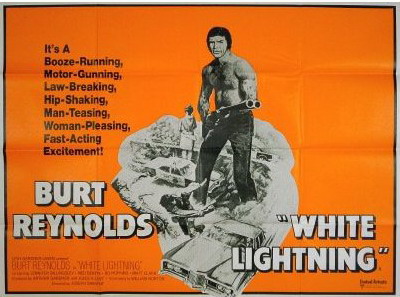
Perhaps the closest thing is a movie called White Lightning about police corruption in Arkansas; yet it gives only a very general and fictional retelling of what justice was like in the county where Williams was murdered.
Released 8 August 1973
Ned Beatty plays the fictitious Sheriff J.C. Connors in White Lightning, said by some to be the spitting image of Faulkner County Sheriff Joe Martin. It was Martin who served as jailer the night Williams died in police custody.
In brief, Williams was a black 21-year old man in May 1960 (serving as a U.S. Army Paratrooper) when two white police officers apparently pulled him into a County jail at night where he was beaten to death by police clubs.
The officers reported Williams was so intoxicated he was non-responsive and fell down stairs killing himself by hitting his forehead. An autopsy report stated that Williams had no alcohol in his blood and he died from a blot clot caused by concussions to the back of his head (White police officers were not afraid to officially report Black men detained by them including handcuffs had succumbed to self-wounds to the back of the head, even rifle shots impossible to inflict on self).
The Williams family reached out to lawyers and the FBI for an investigation and were rebuffed completely. The autopsy wasn’t even reviewed.
Then there appears to be no news until 25 years later there are three brief mentions of events being reconsidered.
First, in August 1985 a trial opens when a witness to murder comes forward no longer afraid to testify:
The case was closed until a former inmate wrote to officials last year saying he saw a black man being beaten by two men the night Mr. Williams was arrested.
Two white former policemen were acquitted by an all-white jury today of charges that they beat a black jail inmate to death 25 years ago. A gasp echoed around the courtroom when the verdict was read, ending the trial of O.H. Mullenax, 48 years old, and Marvin Iberg, 50. […] The day after Mr. Williams died, a coroner’s jury cleared the two policemen, saying Mr. Williams had fallen and struck his head on the courthouse steps. But the jury was not shown either an autopsy report that said Mr. Williams had died of a brain hemorrhage caused by a fracture to the back of his skull or results of a blood test that found no alcohol in his blood. Witnesses at the trial of the two former policemen testified that Mr. Williams drank little or nothing and was uninjured before his arrest.
That seems obviously corrupt on the face of it. Marvin Iberg allegedly had a reputation of being a stereotypical “white power” personality who joined the police to abuse authority.
Presiding Judge Don Langston said after the verdict that the jury ‘could have gone either way. I think the evidence was there to find a guilty verdict’ or to find an innocent verdict.
The key witness reportedly felt so fearful he had to withhold his testimony for 25 years? Clearly fairness was an issue.
Also the witness said he thought jailer Joe Martin was the man who beat Williams to death (Martin later became Sheriff and allegedly so corrupt he inspired the above 1973 movie about tax evasion called White Lightning).
…when Hackney took the witness stand Thursday, he said he saw the late sheriff, Joe Castleberry and jailer Joe Martin beat the prisoner. “As far as I’m concerned, I don’t know what they’re doing with them (Mullenax and Iberg) on trial,” Hackney told reporters after testifying. […] He said he watched the two men beat the black man with a blackjack at the door to the jail. Later that morning, Hackney said, he told then-prosecutor George Hartje, in Castelberry’s presence, that he saw Castleberry beat a man. “The prosecutor told me if I wanted out of his jail, I would say as I was told,” Hackney said.
After all that sudden testimony in 1985 of corruption and concealed evidence, the 1987 Court of Appeals seems then to have written a decision as if there were no known barriers to fair prosecution.
The question presented here is whether these defendants fraudulently concealed evidence. The racial atmosphere of an entire State cannot justly be charged to their personal account. Nor is it true that a black plaintiff’s Section 1983 claim would not have been fairly tried in a federal court in the early sixties…
There are just so many disappointing turns to this case, and interesting circumstances, again I wonder why someone hasn’t at least made a short film about it.
The Court of Appeals even seems to be making a perverse “no true Scotsman” logical fallacy, whereby they argued even if were true all whites in Arkansas are violent racists, such an “atmosphere” should not be thought to include the two white men of Conway alleged to have murdered an innocent black man.
Consider here too that it was in 1986 when the Supreme Court ruled that people cannot be excluded from a jury because of their race, based on the right to a fair trial under the Constitution’s Sixth Amendment and the 14th Amendment promise of equal protection under the law. This Appeals Court in 1987 therefore appears to be directly contradicting the Supreme Court about fairness of federal trials before Batson v. Kentucky, 476 U.S. 79 (1986), let alone in the early sixties.
USA Today has been working on a modern “tarnished brass” database of police misconduct, which might help someday reveal why Marvin Williams’ family was unable to achieve justice.
Every year, tens of thousands of police officers are investigated for serious misconduct — assaulting citizens, driving drunk, planting evidence and lying among other misdeeds. The vast majority get little notice. And there is no public database of disciplined police officers.
I suspect a movie project about his death would expedite the discovery process even more. On the face of it, any reasonable person can see two white men abused their authority in order to lynch a young black man and never were held accountable.
a blog about the poetry of information security, since 1995